오늘은 Spring에서 REST API를 호출할 때 사용하는 RestTemplate의 특징과 메서드, 사용 예시를 정리하도록 하겠습니다.
RestTemplate 이란
RestTemplate의 특징을 정리하면 아래와 같습니다.
- 간편하게 REST 방식의 API를 호출할 수 있는 Spring 내장 클래스입니다.
- Spring 3.0부터 지원하며, Spring 5.0 이후부터는 WebClient를 사용합니다.
- RESTful 원칙을 지키며, HTTP의 여러 메서드를 제공합니다.
- JSON, String, XML 모두 응답받을 수 있습니다.
- Blocking I/O 기반의 동기 방식을 사용합니다.
- Header와 Content-Type을 설정해 외부와 통신할 수 있습니다.
RestTemplate 메서드
RestTemplate이 제공하는 주요 메서드는 아래와 같습니다.
| 메서드 | HTTP | 설명 |
|---|---|---|
| getForObject | GET | 주어진 URL 주소로 GET 메서드를 실행하고 결과를 객체로 반환 |
| getForEntity | GET | 주어진 URL 주소로 GET 메서드를 실행하고 결과를 ResponseEntity로 반환 |
| postForLocation | POST | POST 요청을 보내고 헤더에 저장된 URI를 결과로 반환 |
| postForObject | POST | POST 요청을 보내고 결과를 객체로 반환 |
| postForEntity | POST | POST 요청을 보내고 결과를 ResponseEntity로 반환 |
| delete | DELETE | 주어진 URL 주소로 DELETE 메서드 실행 |
| headForHeaders | HEAD | HTTP HEAD 메서드를 사용해 헤더의 모든 정보를 얻음 |
| put | PUT | 주어진 URL 주소로 PUT 메서드 실행 |
| patchForObject | PATCH | 주어진 URL 주소로 PATCH 메서드 실행 |
| optionsForAllow | OPTIONS | 주어진 URL 주소에서 지원하는 HTTP 메서드 조회 |
| exchange | ANY | HTTP 헤더를 새로 만들 수 있고 어떤 HTTP 메서드도 사용 가능 |
| execute | ANY | Request/Response 콜백 수정 가능 |
RestTemplate 사용 예시
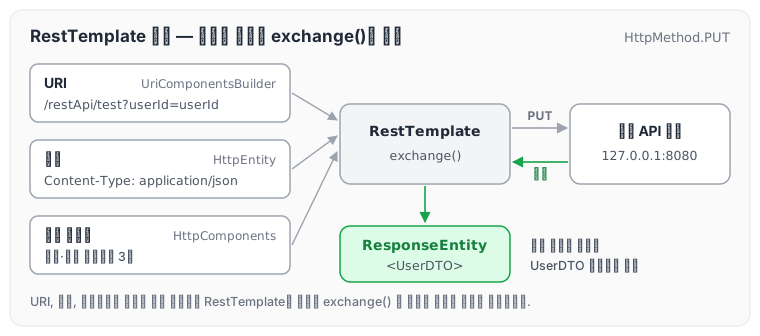
아래는 타임아웃을 설정한 RestTemplate으로 URI와 헤더를 만들어 exchange()로 요청을 보내는 예시입니다.
String path = "/restApi/test";
String param = "userId";

HttpComponentsClientHttpRequestFactory factory = new HttpComponentsClientHttpRequestFactory();
factory.setConnectTimeout(3000); // 타임아웃 설정 3초
factory.setReadTimeout(3000); // 타임아웃 설정 3초

UriComponentsBuilder builder = UriComponentsBuilder.fromUriString("http://127.0.0.1:8080");
builder.path(path);
builder.queryParam(param, param);

UriComponents uriComponents = builder.build().encode();

HttpHeaders httpHeaders = new HttpHeaders();
httpHeaders.add("Content-Type", "application/json");
httpHeaders.add("Accept", "*/*");
HttpEntity<MultiValueMap<String, Object>> requestEntity = new HttpEntity(httpHeaders);

UserDTO userDto = null;
try {
    RestTemplate restTemplate = new RestTemplate(factory);
    ResponseEntity<UserDTO> responseEntity = restTemplate.exchange(uriComponents.toUri(), HttpMethod.PUT, requestEntity,UserDTO.class);
    HttpStatus httpStatus =  responseEntity.getStatusCode();
    if(HttpStatus.OK.equals(httpStatus)) {
        userDto = new UserDTO(httpStatus.value());
    }
}catch (HttpClientErrorException e){
    log.error("{}", "error...");
} catch (RuntimeException re){
    log.error("{}", "error...");
}
return userDto;
요청 팩토리에 연결·읽기 타임아웃을 3초로 설정하고, UriComponentsBuilder로 URI를, HttpHeaders로 헤더를 만든 뒤 exchange()에 함께 넘깁니다. 요청이 만들어지는 흐름을 그리면 다음과 같습니다.
 눌러서 원본 크기로 보기
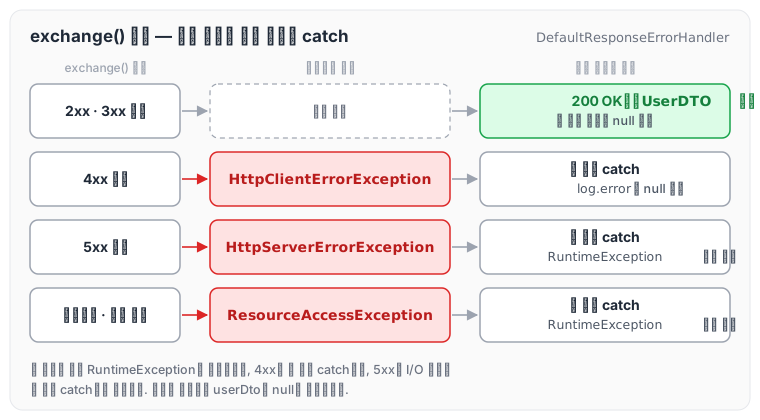
exchange()의 응답 결과에 따라 예시 코드가 어느 분기로 가는지도 정리하였습니다. RestTemplate은 기본 에러 핸들러(DefaultResponseErrorHandler)를 사용하면 4xx 응답에 HttpClientErrorException을, 5xx 응답에 HttpServerErrorException을 던지고, 타임아웃 같은 I/O 오류는 ResourceAccessException으로 던집니다. 이 예외들은 모두 RuntimeException을 상속합니다.
 눌러서 원본 크기로 보기
예시 코드에서는 4xx만 첫 번째 catch에서 따로 잡히고, 5xx와 타임아웃은 두 번째 RuntimeException catch에서 잡힙니다. 어느 경우든 예외가 발생하면 userDto는 null로 반환됩니다.
마무리
오늘은 Spring에서 많이 사용하는 REST API 호출 방법인 RestTemplate에 대해 정리하였습니다. 글을 쓰다 보니 문득, 예전 면접에서 REST API 연동 경험을 물어봤을 때 당황했던 기억이 떠올랐습니다. 물론 통과하긴 했지만, 나름대로 정리해 두는 것도 좋을 것 같아 작성하게 되었습니다.
참조 : https://blog.naver.com/hj_kim97/222295259904, https://backtony.github.io/spring/2021-07-12-spring-basic-8/, https://jjunn93.com/37
댓글
GitHub 계정으로 로그인하시면 댓글과 질문을 남기실 수 있습니다. 남겨 주신 글은 이 저장소의 Discussions에 쌓입니다.